When it comes to small boat sailing, I lean luddite. I like to feel the wind, experience the changing conditions of the water, and consult my paper charts. In my last column (see Riding the Tide in the April 2026 issue), I wrote about my fascination with the highly useful Current Atlas – Juan de Fuca Strait to Strait of Georgia, a reference I turn to regularly. But when I want to get somewhere in a small boat with an additional margin of knowledge and safety, without doing all the work, I confess that I lean on three digital tools.
Tool #1
“Currents are a fact of life in the Pacific Northwest,” sailor David Jade told me recently. “Using them wisely is the difference between arriving well before sunset, or dropping anchor in the dark.”
Jade, who sails a keelboat, encountered the Current Atlas early in his time in our region. He had a great deal of respect and admiration for the information in its pages. As for the format, “it was obvious there was a better way to do it.”
An app developer who runs TinyOctopus.net, Jade told me that at some point, the Current Atlas fell out of print and was no longer easy to find. The Canadian Hydrographic Service (CHS), which has rights to the book and all the data that creates it, didn’t seem interested in reprinting it. But David had ideas for an app that would make the information easier to use.
An app based on the Current Atlas seemed an obvious idea to me, but I had never seen one until Jade’s version, PNW Current Atlas, appeared a few years ago. Creating the app required perseverance. “It took me two years to negotiate with CHS to use the info in the book,” Jade explained.
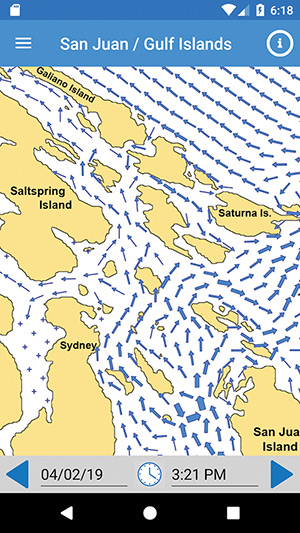
As far as I’m concerned, those two years were well spent. Open PNW Current Atlas, and with the tap of a finger, a basic map of the San Juan and Gulf Islands appears on your device. An array of animated blue arrows swirl across the screen, showing the present pattern of currents or future configurations, with arrow thickness representing relative current strength. PNW Current Atlas works without an internet connection, making it useful for remote locations, or just for unplugging. Part of me was enchanted to see one of my favorite navigation books come to life. Another part gave me pause.
Tool #2
For navigating to points outside of the San Juans and Gulf Islands, most boaters know about the free NOAA or CHS prediction tables for tidal passes like Agate Passage or Seymour Narrows. But those tables only tell a partial story: the broader patterns of water movement are critical for small boat navigation—and for making a trip fun and tenable, instead of a slog.
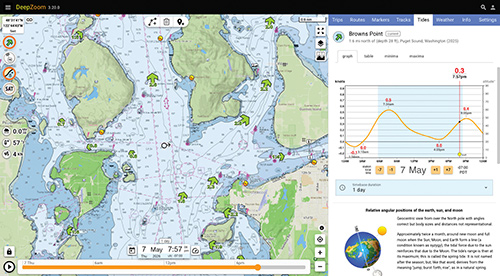
While helpful, the numbers on those tables aren’t always intuitive, so when I want to visualize the bones of a future trip from my home computer, I might turn to DeepZoom.com, which provides basic animation of currents for the major United States passes (using NOAA’s data). It’s a helpful, free, and no-frills approach. It won’t give enough detail to get me perfectly from my beloved Hope Island to Woodard Bay, but it will give me the gist of where currents are flowing throughout a day.
When sails and oars are the primary means of propulsion, navigational details matter. Waiting out a tidal pass is easy, but beating into the wind against an unexpected current for an entire afternoon is just a drag, especially when my cockpit has a freeboard of less than a foot.
Tool #3
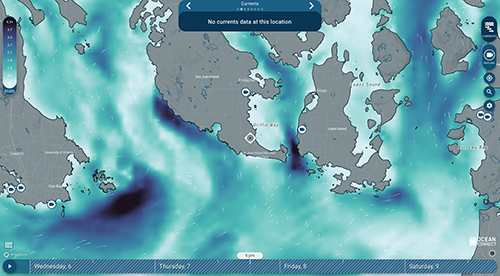
A third digital resource captures the magic and utility of the original Current Atlas—and adds more. The OceanConnect.ca website works on a desktop computer or a smartphone with a data connection. It provides a two-day forecast of currents, wind, and waves, using a combination of computer models and live data from monitoring stations. On my screen, its images feel like a mash up of the northern lights and an armada of shooting stars superimposed on a chart of the Salish Sea and beyond. Blues and greens indicate intensity and speed, helpful animated white arrows show direction. OceanConnect covers an area from Olympia, Washington, through coastal British Columbia, to Southeast Alaska.
I’m slow to adopt any new technology, and it took me several trips using OceanConnect to feel confident that I could trust it. On a two-week San Juan Islands meander, I double checked it against my Current Atlas and found it strikingly helpful. It displayed all the critical detail provided by the Atlas for a given moment—and additional detail that I wouldn’t otherwise have gotten. That information let me move from one place to another with minimal effort.
But how could such a helpful resource be free? To find out, I caught up with OceanConnect software developers Nate Rosenstock and Jorin Weatherston by email. “OceanConnect began as a collaboration between the Canadian Integrated Ocean Observing System’s (CIOOS) Pacific node and the Hakai Institute,” they told me.
The Hakai Institute is a non-profit that conducts long-term ecological research in BC’s coastal and forest ecosystems. It operates laboratories on Calvert and Quadra Islands. CIOOS is a Canadian government service that intends to “make ocean data openly discoverable and accessible.”
OceanConnect staff described the website as intended “for anyone who interacts with the BC waters—sailors, kayakers, swimmers, surfers, divers, and recreational boaters.”
This partnership and process feels like a DNA connection to my old friend the Current Atlas, which was also created via collaboration between scientists from the Canadian government and from the University of British Columbia (among others).
While OceanConnect only works with a data connection, I’ve found it useful for thinking through the day ahead and potentially for a quick check of conditions once underway. It doesn’t replace the long-term planning that the Atlas fosters, but it definitely makes it easy to quickly see what’s happening at the moment and over a broad geographic area.
Overall
Novice sailors may find it tempting to navigate solely by using OceanConnect or other digital tools, but they don’t meet Canadian or American standards for navigation. More importantly, looking at a chart and the world around you allows for a better understanding of the bigger picture. As OceanConnect staff explained, their program is “meant to complement, not replace, official navigation methods and charts.”
I’m on the water for the beauty of the sea, for the adventure, and the way I can clear my mind of land-based responsibilities. I have a duty to return home safely to friends and family, so I choose my timing and tools carefully. But when the tools have too much allure, when I am distracted by them, I revert to using my reliable and basic paper aids.
Even with the best of digital tools, the effect of wind, water movement, waves and activity from larger craft, as well as random stuff like floating debris or my own energy level mean that every tool is a piece of information that might help me get to my anchorage before dark. But only one combines them all into making sound judgment: me.
Bruce Bateau sails and rows traditional boats with a modern twist in Portland, Oregon. His stories and adventures can be found at www.terrapintales.wordpress.com.